This flow allows to add a new ancillary or/and seat to an existing booking.
Supported types of products
Action type |
Type of product |
|---|---|
Add Ancillary |
|
Add Seat |
|
Permissible operation types
The following add operations are possible:
Add ancillary
Add seat
Add seat and ancillary
More than one product can be added during the same operation.
Modify and Add in the same transaction is not allowed
Modify ancillary/seat and Add ancillary /seat is not supported during the same operation.
Message Flow
Order Retrieve: Search flights
The seller uses OrderRetrieveRQ in order to get an updated status of the order
The OrderviewRS contains the updated information of all products and payments into the Order
ServiceList: to obtain ancillaries
The seller uses ServiceListRQ in order to obtain new ancillaries in the scope of the flight
The ServiceListRQ process a request to the supplier in order to get the ancillaries catalog
The ServiceListRS contains the full ancillaries' availability for the new flight
SeatAvail: To obtain seat offers
The seller uses SeatAvailRQ in order to obtain seat map availability in the scope of the flight
The SeatAvailRQ process a request to the supplier in order to get the seat map availability and price catalog
The SeatAvailRS contains the full seat availability for the new flight
OrderChange: Rebook
The seller uses OrderchangeRQ to ask for rebooking the selected offer from orderReshopRS
The OrderReshopRQ orchestrate the rebooking operations into the supplier (1AWS)
The OrderView response contains all the information about the order updated or the error information in case of any error during the flow
Process description
Process 1: OrderRetrieve
Seller sends an IATA_OrderRetrieveRQ request with the supported search criteria (E.g. Order ID or Booking Reference)
OMS validates that the seller specified within the request is a valid seller and has access to the requested Order.
OMS synchronize the Order.
OMS may trigger a message to IFG synchronously in case any changes need to be notified to IFG are detected during the synch process.
OMS may trigger a notification asynchronously in case any changes need to be notified are detected during the synch process.
OMS will create the IATA_OrderViewRS with the relevant information and send to the seller.
Process 2: ServiceList (To retrieve the list of available ancillary services for the selected offer)
Seller sends an IATA_ServiceListRQ request with the selected reshop offer.
OMS verifies that seller is valid (using Seller Profile).
OMS retrieves the list of available ancillary service offers from the supplier (Amadeus) for the rebooked flights.
OMS returns the IATA_ServiceListRS to the seller
Process 3: SeatAvailability (To retrieve the seatmap for the rebooked flight)
Seller sends an IATA_SeatAvailabilityRQ request with the selected reshop offer.
OMS verifies that seller is valid (using Seller Profile).
OMS retrieves the seatmap with price from the supplier (Amadeus) for the rebooked flights.
OMS returns the IATA_SeatAvailabilityRS to the seller.
Process 4: OrderReshop: (To reprice the selected offers for seat and ancillary services within OMS)
Seller sends an IATA_OrderReshopRQ request with the selected offers for seat and/or ancillary services.
OMS verifies that seller is valid (using Seller Profile) and can access the requested Order.
OMS checks existing seat and/or ancillary services to see any credit can be applied.
OMS calculates the final price for seat and/or ancillary services that customer has to pay if there is an existing credit.
OMS adds a “price change” warning to the response to indicate that price for seat and/or ancillary services is changed if credit is applied.
OMS returns the IATA_OrderReshopRS to the seller.
Process 5: OrderChange: (Rebook flights)
Seller sends an IATA_OrderChangeRQ request with the selected seats and ancillaries
OMS verifies that the seller is valid (using Seller Profile) and can access the requested Order.
OMS validates that servicing is enabled for the seller.
OMS validates that the seller is an active IATA agent (IFG)
OMS authorizes the payment using the payment gateway (APP).
OMS rebooks the requested order items within PSS and documents are issued. This involves following actions:
Validate offline changes that may impact rebook process before making any updates within the PSS.
Confirm pricing to create TSM-P.
Book ancillary services (Adding SSR).
Book the seats. (Add SSR)
Check for existing reassociated EMDs that potentially can be used for ancillaries/seats being added
Price new ancillary services using integrated pricing
Reprice ancillary services and/or seats (E.g. Seat in example above) if previously booked ancillary services and/or seats exists and if existing EMD-A have NOT been automatically re-associated with the ticket and SSR element at the time of booking.
Add the form of payment information (old and/or new) to TSM-P (ancillary services and/or seats).
Issue new travel documents (EMD-A).
OMS retrieves the documents to get the final status.
OMS updates the Order with the latest information from the PSS.
OMS initiates the refund for EMD-S (Residual Value) if any.
OMS reports the transaction to IFG (Reissue for EMD-A and refund for EMD-S if any).
OMS triggers the notifications.
OMS generate the IATA_OrderViewRS with the relevant status information
Steps ServiceList and SeatAvailability are independent of each other and, depending on the type of ancillary needed, can be used interchangeably or together.
Samples
Order Setup
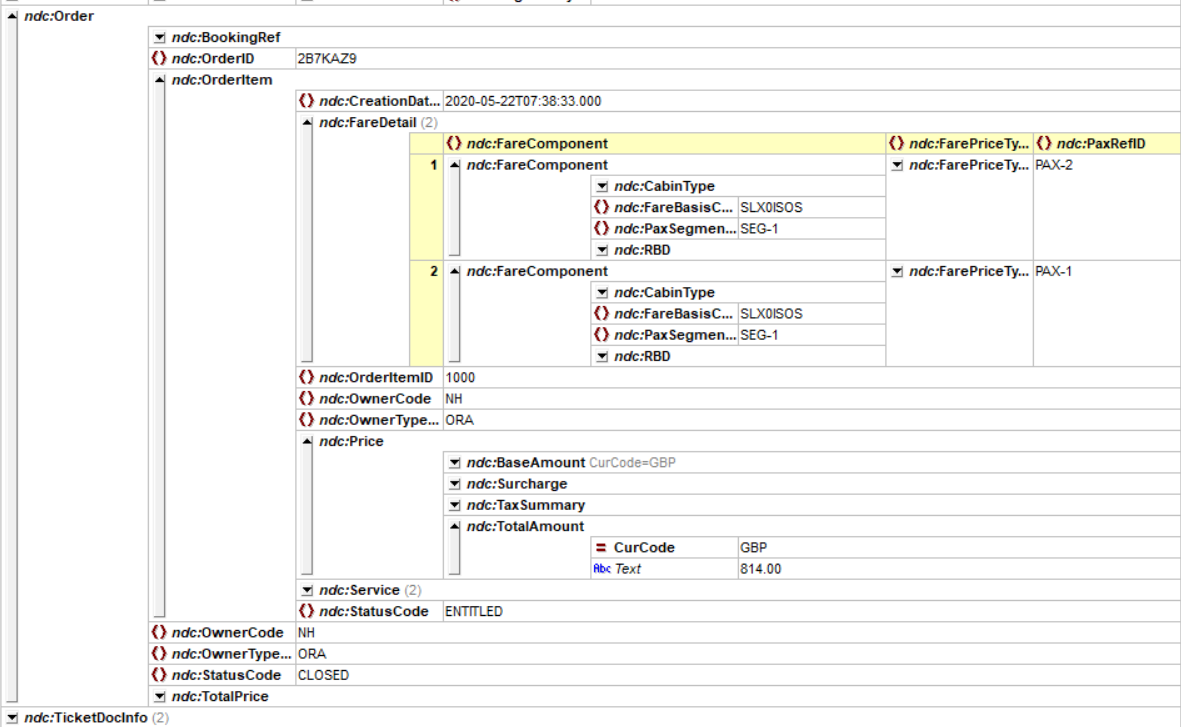
The seller has a booking already created
IATAOrderRetrieve
IATAOrderRetrieveRQ
<?xml version="1.0" encoding="UTF-8"?>
<soapenv:Envelope xmlns:soapenv="http://schemas.xmlsoap.org/soap/envelope/">
<soapenv:Header>
</soapenv:Header>
<soapenv:Body>
<IATA_OrderRetrieveRQ xmlns="http://www.iata.org/IATA/2015/00/2018.2/IATA_OrderRetrieveRQ">
<Party>
<Sender>
<RetailPartner>
<RetailPartnerID>NDC03GBP</RetailPartnerID>
</RetailPartner>
</Sender>
</Party>
<PayloadAttributes>
<PrimaryLangID>en</PrimaryLangID>
<VersionNumber>18.2</VersionNumber>
</PayloadAttributes>
<PointOfSale>
<Country>
<CountryCode>GB</CountryCode>
</Country>
</PointOfSale>
<Request>
<OrderFilterCriteria>
<Order>
<OrderID>2B7KAZ9</OrderID>
<OwnerCode>NH</OwnerCode>
</Order>
</OrderFilterCriteria>
</Request>
</IATA_OrderRetrieveRQ>
</soapenv:Body>
</soapenv:Envelope>
IATAOrderViewRS

IATAServiceList
IATAServiceListRQ
<?xml version="1.0" encoding="UTF-8"?><soapenv:Envelope xmlns:soapenv="http://schemas.xmlsoap.org/soap/envelope/">
<soapenv:Header/>
<soapenv:Body>
<IATA_ServiceListRQ xmlns:xsi="http://www.w3.org/2001/XMLSchema-instance" xmlns="http://www.iata.org/IATA/2015/00/2018.2/IATA_ServiceListRQ">
<Party>
<Sender>
<RetailPartner>
<ContactInfo/>
<RetailPartnerID>NDC03GBP</RetailPartnerID>
</RetailPartner>
</Sender>
</Party>
<PayloadAttributes>
<PrimaryLangID>en</PrimaryLangID>
<VersionNumber>18.2</VersionNumber>
</PayloadAttributes>
<PointOfSale>
<Country>
<CountryCode>GB</CountryCode>
</Country>
</PointOfSale>
<Request>
<CoreRequest>
<Order>
<OrderID>2B7KAZ9</OrderID>
</Order>
</CoreRequest>
</Request>
</IATA_ServiceListRQ>
</soapenv:Body>
</soapenv:Envelope>
IATAServiceListRS

IATASeatAvailable
IATASeatAvailRQ
<?xml version="1.0" encoding="UTF-8"?><soapenv:Envelope xmlns:soapenv="http://schemas.xmlsoap.org/soap/envelope/">
<soapenv:Header>
</soapenv:Header>
<soapenv:Body>
<IATA_SeatAvailRQ xmlns="http://www.iata.org/IATA/2015/00/2018.2/IATA_SeatAvailabilityRQ" xmlns:xsi="http://www.w3.org/2001/XMLSchema-instance" xsi:schemaLocation="http://www.iata.org/IATA/2015/00/2018.2/IATA_SeatAvailabilityRQ .xsd">
<Party>
<Sender>
<RetailPartner>
<ContactInfo/>
<RetailPartnerID>NDC03GBP</RetailPartnerID>
</RetailPartner>
</Sender>
</Party>
<PayloadAttributes>
<PrimaryLangID>en</PrimaryLangID>
<VersionNumber>18.2</VersionNumber>
</PayloadAttributes>
<PointOfSale>
<Country>
<CountryCode>GB</CountryCode>
</Country>
</PointOfSale>
<Request>
<CoreRequest>
<Order>
<OrderID>2B7KAZ9</OrderID>
</Order>
</CoreRequest>
</Request>
</IATA_SeatAvailRQ>
</soapenv:Body>
</soapenv:Envelope>
IATASeatAvailRS

IATAOrderChange
IATAOrderChangeRQ
<?xml version="1.0" encoding="UTF-8"?><soapenv:Envelope xmlns:soapenv="http://schemas.xmlsoap.org/soap/envelope/">
<soapenv:Header>
</soapenv:Header>
<soapenv:Body>
<IATA_OrderChangeRQ xmlns="http://www.iata.org/IATA/2015/00/2018.2/IATA_OrderChangeRQ">
<Party>
<Sender>
<RetailPartner>
<RetailPartnerID>NDC03GBP</RetailPartnerID>
</RetailPartner>
</Sender>
</Party>
<PayloadAttributes>
<PrimaryLangID>en</PrimaryLangID>
<VersionNumber>18.2</VersionNumber>
</PayloadAttributes>
<PointOfSale>
<Country>
<CountryCode>GB</CountryCode>
</Country>
<Device>
<DeviceCode>123</DeviceCode>
</Device>
</PointOfSale>
<Request>
<ChangeOrder>
<UpdateOrderItem>
<AcceptOffer>
<!--Seat - SeatAvail-->
<SelectedOffer>
<OfferRefID>OFF-SEAT-1</OfferRefID>
<OwnerCode>NH</OwnerCode>
<SelectedOfferItem>
<OfferItemRefID>OFFIT-ANC-SEAT-00-1</OfferItemRefID>
<PaxRefID>PAX-1</PaxRefID>
<SelectedSeat>
<ColumnID>A</ColumnID>
<SeatRowNumber>35</SeatRowNumber>
</SelectedSeat>
</SelectedOfferItem>
<SelectedOfferItem>
<OfferItemRefID>OFFIT-ANC-SEAT-00-2</OfferItemRefID>
<PaxRefID>PAX-2</PaxRefID>
<SelectedSeat>
<ColumnID>B</ColumnID>
<SeatRowNumber>35</SeatRowNumber>
</SelectedSeat>
</SelectedOfferItem>
<ShoppingResponseRefID>481cd1a0-6bb4-412b-819b-7e37e1f8d7e0</ShoppingResponseRefID>
</SelectedOffer>
<!--Baggage - ServiceList-->
<SelectedOffer>
<OfferRefID>OFF-1</OfferRefID>
<OwnerCode>NH</OwnerCode>
<SelectedOfferItem>
<OfferItemRefID>OFFIT-ANC-BAG-1-1</OfferItemRefID>
<PaxRefID>PAX-1</PaxRefID>
<SelectedALaCarteOfferItem>
<Qty>1</Qty>
</SelectedALaCarteOfferItem>
</SelectedOfferItem>
<SelectedOfferItem>
<OfferItemRefID>OFFIT-ANC-BAG-2-1</OfferItemRefID>
<PaxRefID>PAX-2</PaxRefID>
<SelectedALaCarteOfferItem>
<Qty>1</Qty>
</SelectedALaCarteOfferItem>
</SelectedOfferItem>
<ShoppingResponseRefID>7ee5442f-d9ca-4f10-afe0-fa6613e62b3f</ShoppingResponseRefID>
</SelectedOffer>
</AcceptOffer>
</UpdateOrderItem>
</ChangeOrder>
<DataLists>
<PaxList>
<Pax>
<AgeMeasure>30</AgeMeasure>
<PaxID>PAX-1</PaxID>
<PTC>ADT</PTC>
</Pax>
<Pax>
<AgeMeasure>30</AgeMeasure>
<PaxID>PAX-2</PaxID>
<PTC>MIL</PTC>
</Pax>
</PaxList>
</DataLists>
<Order>
<OrderID>2B7KAZ9</OrderID>
<OwnerCode>NH</OwnerCode>
</Order>
<PaymentInfo>
<Amount CurCode="GBP">372.60</Amount>
<PaymentInfoID>PAYMENT-2</PaymentInfoID>
<PaymentMethod>
<PaymentCard>
<CardBrandCode>VI</CardBrandCode>
<CardHolderName>NDCModule</CardHolderName>
<CardNumber>4512340621901233</CardNumber>
<CardSecurityCode>123</CardSecurityCode>
<CardTypeText>CC</CardTypeText>
<ExpirationDate>1220</ExpirationDate>
</PaymentCard>
</PaymentMethod>
<TypeCode>CC</TypeCode>
</PaymentInfo>
</Request>
</IATA_OrderChangeRQ>
</soapenv:Body>
</soapenv:Envelope>
IATAOrderViewRS

Logs